Part 4 in the SEO Death series.

If you look at your robots.txt file, you usually don’t want to see this:
User agent: *
Disallow: /
Because if you see this, then you usually see this:
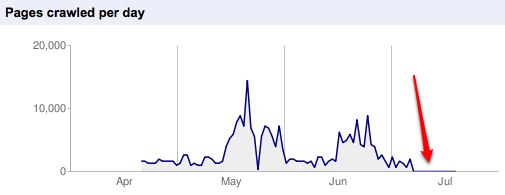
Do not disallow all.
Here endeth the lesson.
or perhaps here
Part 4 in the SEO Death series.
If you look at your robots.txt file, you usually don’t want to see this:
User agent: *
Disallow: /
Because if you see this, then you usually see this:
Do not disallow all.
Here endeth the lesson.
or perhaps here

10 Response Comments
Short but definitive lesson! Talking about robots.txt file, we once came across a website displaying the following info – Sitemap: http://www.insertyourwebsitenamehere.com/sitemap.xml – and the webmaster had no idea why this website’s pages weren’t all indexed “because he was using the XML Sitemap protocol”… An idea for SEO Death part 5?
What exactly do you mean by that?
Got to this one a little late. I am assuming Bernie means that they just added a URL called /sitemap.xml but never actually added any sitemap files. This is not SEO Death. This is more like brain death.
Hi guys. Thought I might provide more info… Let’s say the client has a website called http://www.cannywebsite.com. On their robots.txt file, they added a Sitemaps line with the following info – Sitemap: http://www.insertyourwebsitenamehere.com/sitemap.xml – they just didn’t update the domain name… and the guy couldn’t understand why it didn’t work “because he just copied what was written in an article about sitemaps”. Definitely brain death here.
Andrew,
This is an excellent blog I’ve read for some time but haven’t posted.
A universal disallow is definitely bad news – but what about blocking certain ares to reduce duplicate content (categories, archives, tags, etc.)?
Your thoughts on the best way to approach that?
Nice to see you out in the daylight Duncan. Re blocking specific areas as long as your URLs are set up with directories that allow you to isolate specific page types, you can block the bots in the robots.txt from crawling these directories. I also recommend double-bagging them by using the noindex tag on these pages.
Thanks for the reply Andrew. Keep up the good work!
Great Post. This is new to me and I appreciate
it.
Thanks!
sorry if this is a bit basic but I am not a teccie but I think the mate helping me with SEO has got something wrong. The section below is from my robots.txt file and I think it may be blocking most of the images on my site but he is insisting that it is allowing only the correctly sized ones I want.
User-agent: Googlebot-Image
Allow: /_images/products/270×250/
Allow: /_images/products/75×73/
Disallow: /
Is this bad syntax as I have 9000 images on my site but Gogle can only see 114 of them!
Sorry for the very late response Harvey. If those two directories in the Allow lines contain the images you want, this should be fine.